Neck Ergonomics
Introduction
Neck ergonomics focuses on maintaining proper posture and positioning of the neck during daily activities like working on a computer, using a phone, or driving. Good neck ergonomics help reduce strain on muscles and joints, preventing pain, stiffness, and long-term issues such as cervical spondylosis.
- The fast-paced nature of modern work life makes it important to focus on cervical health. By using proper ergonomics, you can prevent neck pain and improve your general health. Making small adjustments to the workplace can significantly help in avoiding neck issues, especially if you work long hours. Experts who treat cervical discomfort recommend ergonomic changes to address and prevent neck problems.
- By focusing on small but important details, we can transform your workspace into a healthier environment. Office workers frequently have neck pain, which can be avoided with ergonomic workstation arrangements. Things like having the wrong height for your desk and chair, sitting for too long, and not sitting up straight can all lead to neck pain.
- Thankfully, there are a number of methods to arrange your office to minimize neck strain and avoid pain.
Understanding how to prevent pain and stiffness?
- The first approach is to educate yourself about ergonomics and neck pain. The study concerning human efficiency to increase people’s ease and effectiveness at work is known as ergonomics.
- Poor ergonomic practices, such as improper desk and chair height, bad posture, and extended sitting, can contribute to the frequent problem of neck pain. You can avoid suffering by making easy changes to your workspace if you understand how ergonomics affects neck pain.
- Neck strain is easy to avoid when your desk and chair are set up to support you comfortably. To keep your legs flat on the flooring and your knee joints in the right position, you’ll need an adjustable chair.
- Because you should be typing with your arms parallel to the floor, the place where you work should be at an appropriate height. You may reduce neck discomfort and enhance your posture by using an ergonomic chair with neck support. Since long hours at a desk often lead to poor posture, this is a common cause of neck pain.
Understanding Ergonomics and Neck Pain
- Spending excessive time at a desk often leads to neck pain for many people. One major cause of neck pain is bad posture, which can be caused by a number of things, such as an incorrectly positioned monitor, an incorrectly raised chair, or poor keyboard and mouse placement.
How Bad Posture Affects Neck Health
- Several issues, such as headaches, muscle strain, and neck pain, can be caused by poor posture. Muscle fatigue and pain may result from the muscles requiring more effort to support the head’s weight when the neck is not in a neutral position. Chronic pain and other health issues can result from spinal misalignment caused by bad posture over time.
Key Ergonomic Guidelines for Workstation Settings
- The science of creating work environments that meet employee demands is known as ergonomics. In order to avoid neck pain and other health issues, desk arrangements should adhere to a few key ergonomic principles.
Seat Adjustments for the Best Neck Pain Prevention
Try the following ideas to make your chair more neck-friendly:
- Adjusting the height of the chair helps keep your knees aligned properly and ensures that your feet rest flat on the ground.
- Blood flow and blood pressure are improved when you keep your knees close to the edge of the seat.
- Your backrest must support your lumbar area and follow the natural curve of your spine in order to relieve neck pain.
- Once your chair has been adjusted for support, it’s time to orient your monitor for an ergonomic seat.
Track Positioning to Avoid Neck Pain and Strain
Neck health depends on properly configuring a monitor.
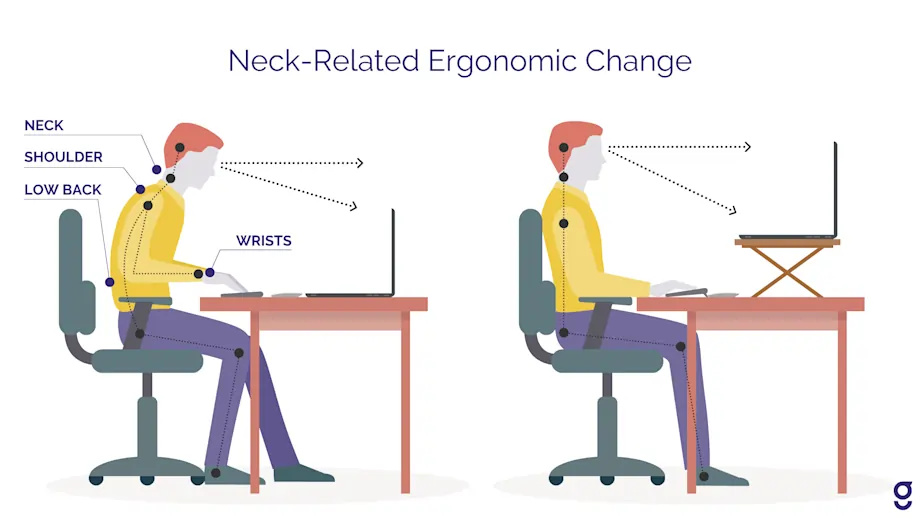
- Set your monitor at eye level to save your neck from strain, and keep it about an arm’s length away so you don’t end up leaning in.
- Use a monitor stand or books to lift it if needed.
- As you adjust your screen to reduce neck strain, don’t forget to adjust the mouse and keyboard as well for general neck care.
Using an ergonomic keyboard and mouse
- Ergonomic keyboards and mice are necessary for neck care. In order to avoid wrist strain and arm reach, keep your elbows at an equal angle while using your keyboard.
- Maintaining a natural wrist posture can be facilitated by placing the mouse pad or keyboard tray with a wrist rest.
- You could protect your neck and avoid head tilting by holding your screen at eye level.
- Ensure that the height of your workstation allows your arms to stay parallel to the floor. Another choice is an ergonomic chair with neck support, which significantly reduces neck pain and enhances posture. Bad posture is a major contributing factor to neck pain, which is often caused by prolonged desk work.
- Including pauses and mobility in your routine can help avoid neck pain caused by extended sitting.
Making Use of Document Holders and Laptop Stands
- It is not advised to use computers for extended periods of time since this can cause neck and shoulder discomfort.
- This can be avoided by using a laptop stand that brings the screen up to eye level and by keeping the keyboard and mouse apart. Document holder helps reduce neck strain by positioning your papers at eye level, so you don’t have to constantly look down while working.
- The proper height and angle of a keyboard tray can improve typing comfort and reduce neck and shoulder strain.
The Function of Footrests in Posture Maintenance
- Footrests are necessary to maintain good posture. Another significant difference is a footrest, which keeps your feet flat and in the right position to support your lower back.
- Lower back pain can be prevented by keeping the feet flat on the ground, which preserves the lower back’s natural curve.
- By placing a footrest to help you maintain good posture, you can also reduce the strain on your shoulders and neck. It’s an easy method to make sitting for extended periods more comfortable.
Including Movement and Breaks to Prevent Neck Pain
- To make desk work less uncomfortable, incorporate these routines into your day
Take regular pauses to exercise and stretch.
- Use the 20-20-20 rule to decrease eye pain.
Appropriate Posture Methods to Avoid Neck Pain
- Attempt to sit with your neck and shoulders relaxed and your back straight.Ensure that your feet are securely positioned on the ground and that your hips and knees are properly aligned. Make sure your elbows are 90 degrees off the floor and the palms of your hands are parallel to it when typing.
- A key component of cervical health is posture. Aligning your head with the middle of your body will help your neck muscles work more efficiently.
Your ears can be moved by relaxing your shoulders away from them. - By practicing these posture techniques on a regular basis, you take charge of your cervical health, which opens up a discussion about how daily routines can improve your overall health.
- Preventing neck pain requires regular exercise, particularly activities that strengthen the muscles that support the cervical spine. Remember to stay hydrated by drinking water frequently.
To improve your range of motion, incorporate yoga and other flexibility exercises. - To encourage better posture and reduce tension, strengthen those in your upper back and neck muscles.
Not only does your cervical health improve through these daily practices. They are a part of an all-encompassing strategy for health. - They are part of a comprehensive strategy for health. Your body can better handle the demands of your profession if you take these steps.
Exercise and Stretching for Desk Workers
- Exercise and stretching are also crucial for desk workers.
- Neck pain can be avoided by stretching to increase flexibility, decrease stiffness, and avoid muscle imbalances.
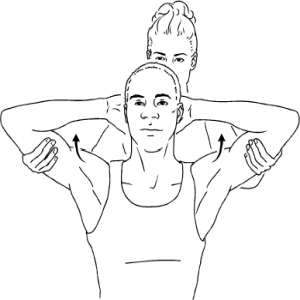
- Neck pain can be lessened with shoulder shrugs, chest stretches, and side-by-side neck rolls.
- Including exercise in your regimen can help avoid neck pain in addition to stretching. Improved circulation, stronger muscles, and less stress are all benefits of exercise that can help with neck discomfort and general health.
- A variety of technologies can help maintain proper posture and ergonomics to prevent neck pain.
Software for Ergonomics
- Technology like ergonomic reminders can serve as a constant reminder to maintain proper alignment and take rests during the day.
Wearable Technology
- Wearable technology can help you maintain good alignment by tracking your posture and warning you when you slouch.
Ergonomic Adjustments for Common Workspace
| Workspace Element | Adjustment Tips | Benefits |
|---|---|---|
| Chair | Adjust height, ensure back support | Reduces lower back and neck strain |
| Desk | Set at elbow height | improves arm and wrist posture |
| Monitor | Eye level alignment | to Prevents neck strain |
| Keyboard & Mouse | Close placement with wrist support | Reduces arm and wrist strain |
How to Avoid Neck Pain When Using Cell Phones
- The Right Mobile Device Utilization
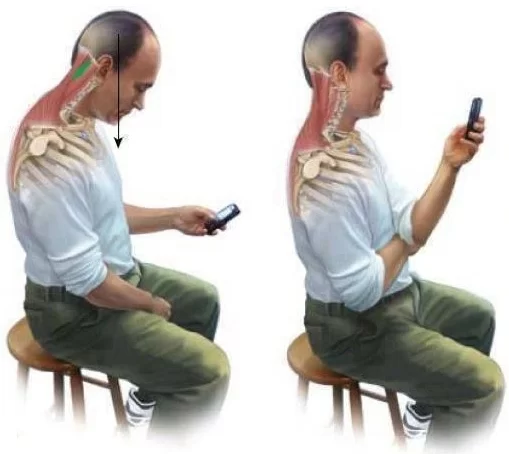
- Avoiding looking down is made easier by holding your gadget at eye level.
- Breaks: Stop frequently to stretch your neck and shoulders.
Comparison of Ergonomic Tools
| Tool Type | Examples | Primary Benefit |
|---|---|---|
| Chairs | Ergonomic office chairs | Support natural spine curve |
| Desk Accessories | Monitor stands, footrests | Improve posture |
| Input Devices | Ergonomic keyboards, mice | Reduce arm and wrist strain |
| Software & Wearable | Ergonomic reminder apps, wearable | Monitor and correct posture |
The Best 5 Ergonomic Guidelines for Home Offices
- Invest in a designed desk and chair.
- Aim for eye level on your monitor.
- Preferably, your keyboard and mouse should be positioned close to one another.
- Take stretch breaks throughout your day.
- Make use of footrests and wrist supports as ergonomic equipment.
Important Takeaways
- To prevent discomfort and soreness, one must be knowledgeable about ergonomics and neck pain.
It’s crucial to set up your desk and chair correctly to support your neck in order to avoid discomfort - Including pauses and mobility in your routine can help avoid neck pain caused by extended sitting.
Conclusion
Ergonomics Posture for Neck Discomfort Prevention: Maintaining good posture and regular mobility helps to avoid neck pain. You may greatly lower your chance of developing neck pain and enhance your general health by implementing these adjustments.
For optimal results, make sure to evaluate your workspace, take frequent breaks, and include neck exercises in your regimen. Use alignment and ergonomics to prevent neck pain by creating routines, stretches, and techniques that reduce cervical strain.
FAQs
Why does neck ergonomics have any effect?
The prevention of headaches, stiffness, neck pain, and other musculoskeletal problems that may result from bad posture or repetitive strain requires proper neck ergonomic practices.
Which bad ergonomic habits lead to neck aches the most frequently?
Forward head position is frequently demonstrated by leaning forward to view screens.
Prolonged sitting: Sitting for extended periods without breaks or modifications can cause neck strain.
Inadequate chair support: Slouching, which puts strain on the neck, can be encouraged by an unsupportive chair.
What are some ways I can use my phone without getting neck pain?
Use the phone by keeping it at eye level.
Hold the phone near eye level while using it.
You can take breaks by following the 20–20-20 rule, which suggests focusing on objects 20 feet away for 20 seconds every 20 minutes.
Avoid extended use: Try to balance extra phone use with other activities.
Which neck ergonomic exercises are there?
Neck stretches
Chin tucks: To bring your head into line with your spine, sit upright and gently tuck your chin.
Shoulder rolls
Stretches for the upper back
Can the ergonomics of my neck be affected by a pillow?
Yes, the neck’s condition is significantly impacted by the kind of cushion you use. You should use a cushion to support your neck’s natural bend and maintain the alignment of your spine. Neck strain can occur when pillows are either excessively high or too low. It is frequently recommended to utilize memory foam or contour pillows to maintain proper neck alignment during sleep.
References
- Neuenschwander, R., DC. (2024, July 29). Proper Ergonomics and Posture for Neck Pain Prevention are Important | Neu Life Chiropractic – Tomball. Neu Life Chiropractic. https://neulifechiro.com/ergonomics-and-posture-for-neck-pain-prevention
- Subramanian, B. (2024, November 7). Ergonomic solutions for effective neck pain prevention. Sri Balaji Hospital. https://www.sribalajihospital.com/cervical-pain/prevention/#:~:text=Take%20frequent%20breaks%20to%20stretch,can%20boost%20your%20well%2Dbeing..
- Naparato, E. (2024, August 27). Ergonomic Desk setups for neck pain prevention: Tips and tricks. EFFYDESK. https://effydesk.com/blogs/news/ergonomic-desk-setups-for-neck-pain-prevention-tips-and-tricks?srsltid=AfmBOooUr42jVjsxf0Zu3s5BffZll2xtO4jwcB6AT6MtNqxmaVXB3XUb