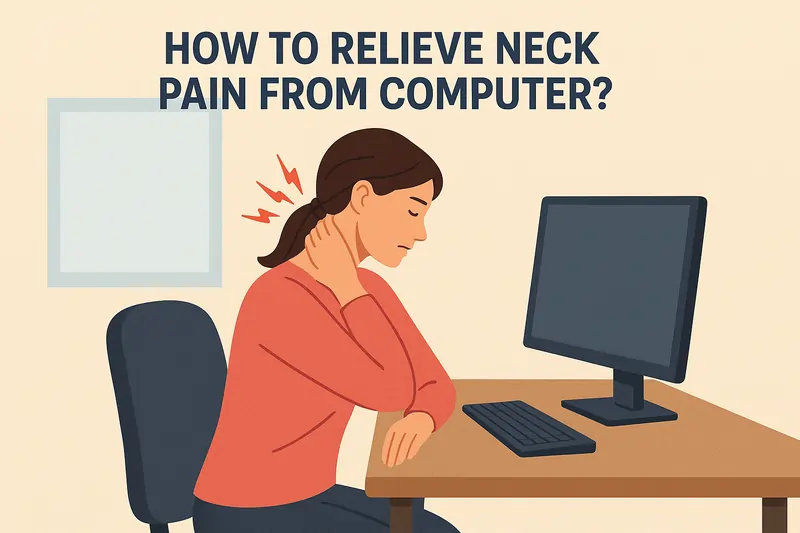
How to Relieve Neck Pain From Computer?
Neck pain from prolonged computer use is a common issue caused by poor posture, screen positioning, and muscle strain.
Understanding the causes and adopting simple strategies like ergonomic adjustments, posture correction, and targeted exercises can help relieve and prevent neck pain effectively.
Introduction
- “Text Neck,” which refers to the muscle strain caused by using devices like computers, phones, and tablets, is a common sight in workplaces and homes, as well as while walking down the street or waiting in line. As people spend more time on their smartphones, this issue will only worsen.
- In order to hold your head up when working on your laptop or leaning down at your phone, you need to strengthen the muscles at the back of your neck.
- Your muscles exert more effort to hold your head upright the longer you look downward. Looking down at our computers, tablets, or smartphones all day can cause these muscles to become excessively strained and uncomfortable. We refer to that as tech neck.
- Even among younger adults, computer-related neck pain is becoming more and more common. This condition, which is often called “tech neck” or “computer neck,” is caused by a forward head posture and slouched shoulders and can cause stiffness, discomfort, and occasionally even headaches. If left untreated, it may begin as a minor soreness but eventually develop into a chronic problem.
- Computer-related neck pain is typically caused by poor posture, repetitive strain, and improper workstation design. The majority of people are unaware that even seemingly insignificant behaviors, such as hunching the shoulders when typing or tilting the head slightly forward to gaze at a screen, can result in tension and discomfort in the muscles of the upper back and neck.
Reasons for Computer-Related Neck Pain
Uncomfortable posture
- Forward head posture, in which the head protrudes forward toward the screen, is one of the main offenders. It will put a lot of stress on the muscles in the upper back and neck. Over time, this results in stiffness, discomfort, and muscular fatigue.
Extended Use of Screen Time Without Intermissions
- Your muscles become tense and overworked after hours of sitting in one position. The neck muscles become less flexible and resilient when not regularly used, which increases their vulnerability to strain.
Inaccurate Height and Distance Monitor
- If your display is too far away, excessively high, or below eye level, you may unintentionally tilt your head or lean forward. Your shoulders and neck are subjected to needless strain because of this misalignment.
Incorrect Desk or Chair Configuration
- Poorly designed workstations, like desks that force you to stoop or chairs without lumbar support, can cause spinal misalignment, particularly in the upper back and neck area.
Insufficient Motion
- It’s simple to forget to move when you’re absorbed in your work. An extended period of immobility lowers blood flow to the muscles and joints, resulting in stiffness and pain.
Tension in the muscles and stress
- A common sign of mental stress is tightness in the muscles, especially in the neck and shoulders. Your muscles may stay tense even when you’re not using them if you’re under stress at work.
Repeated Motions
- Uneven muscle use can result from frequent mouse use or switching between screens, particularly if you’re constantly turning your head to one side. Over time, this may result in pain and muscular imbalances.
Risk Factors
- Extended sitting at a computer workstation for 6 to 8 hours a day with no change in posture causes chronic stress on the muscles of the neck and upper back. Muscle tiredness, poor blood flow, and stiffness may result from this. This can eventually lead to tight and weak muscles that support the head and neck, which can exacerbate chronic discomfort.
- The body adopts painful positions as a result of a poorly built workplace. For example, a chair with insufficient neck or lumbar support can result in slouching and forward head posture, which strains the cervical joints and overloads muscles. However, a display that is too high or too low causes the neck to tilt or bend all the time.
- Head Position Forward. The neck extensors have to work harder to keep the head up when it is anteriorly inclined in relation to the shoulders.
- The neck muscles are subjected to an extra 4–5 kg of strain for every inch of forward head posture. This frequently happens automatically when reading small print or bending toward a screen.
- Poor Muscles in the Back, Our bodies cannot maintain proper posture for extended periods of time when our shoulder stabilizers, trapezius, and extensor muscles are weak; As a result, we may sag forward and increase the strain on our cervical spine.
- Absence of Movement and Intermissions
Hours spent in a single, immobile position lower blood flow to the joints and muscles. - This makes tissues more susceptible and less pliable. Microtraumas build up in muscles, ligaments, and tendons, eventually causing pain and inflammation.
- Prolonged Tension and Stress
Involuntary tightness of the shoulder and neck muscles brought on by stress frequently results in stiffness and discomfort. - This can exacerbate postural issues and is referred to as “stress-related muscle tension.”
Signs and symptoms
- stiffness in the neck
- Localized Pain in the Neck
- Upper back and shoulder pain that radiates
- The pain may radiate to the upper back
- Cervicogenic headaches, or headaches
- Numbness or tingling in the hands and arms
- Weakness and Fatigue of Muscles
- A sensation of burning or throbbing
How to Relieve Neck Pain?
- Ergonomic Modifications: You can reduce shoulder and neck pain by making minor changes to your workspace. Table and Chair Height: In order to maintain spinal alignment, bend your elbows at a 90-degree angle when typing, keeping your feet level on the ground or supported by a footrest.
- Eye-level monitor positioning: To avoid having to bend your neck up or down for extended periods of time, the top of your computer screen should be at or just below eye level.
- Connect an extra keyboard and mouse if you’re using a laptop, so that your hands are comfortable and the screen is at the right height.
- A Chair that provides sufficient headrest and lower back (lumbar) support can help maintain proper posture and avoid neck muscle strain.
- Tips for Correcting Posture: By keeping your spine neutral and avoiding rounding your shoulders or bending forward toward the screen, you relieve strain on your neck and give your muscles a chance to relax. Do not bend forward in front of the screen. Your neck muscles have to work harder when you lean forward because of the increased weight on your neck.
- Place Your Ears Over Your Shoulders. Visualize a straight line extending from your ears through your shoulders to achieve the optimal head posture.
- Stretch and Movement Breaks. A Long duration of sitting can cause discomfort, even if you have perfect posture. To prevent muscles from tensing up, stay moving.
- The 20-20 Rule suggests that every 20 minutes, you should look at an object 20 feet away for a duration of 20 seconds to reduce strain on your neck and eyes.
- Daily Mild Neck Stretches: To ease stiff muscles, carefully tilt your head forward and backward, then side to side. Shoulder Rolls and Upper Back Mobilization: Roll your shoulders back 10 times to improve circulation and relieve soreness.
- Neck and upper back stretches and strengthening exercises assist in maintaining muscular strength and preventing pain. To strengthen your neck stabilizer muscles.
- Perform a chin tuck by aligning your shoulders back and down, maintaining an upright position whether sitting or standing, and retracting your chin to form a double chin.
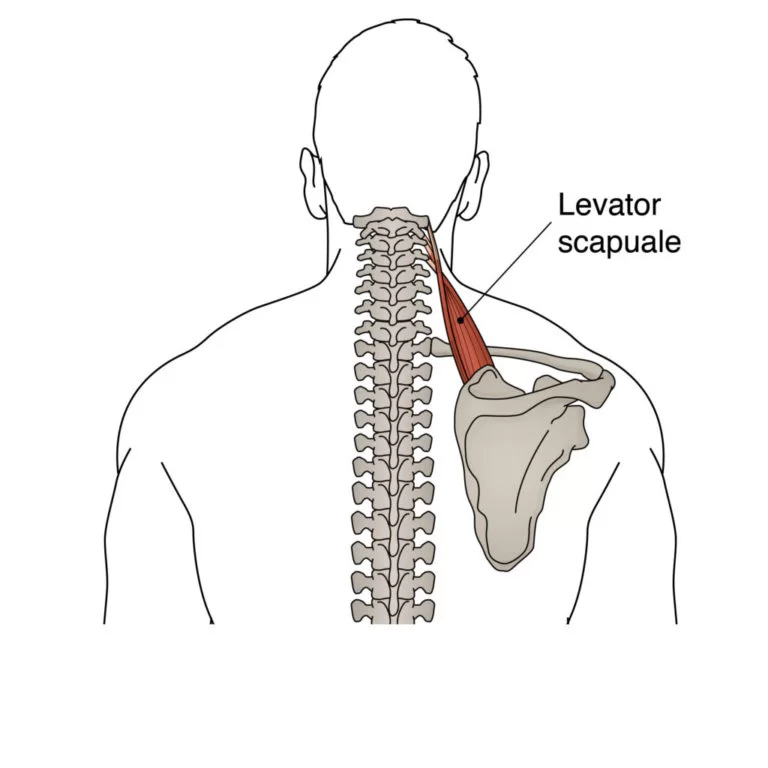
- To perform the Upper Trapezius Stretch, lean forward to one side and reach for that hand with your other hand. Hold the stretch for 10-20 seconds. For a deeper stretch, lay your palm on the back of your head and gently press against it while looking down towards your armpit.
- Scapular Retraction Exercises: To engage your upper back muscles, pull your shoulder blades together and hold for five seconds.
- Add-ons for your computer: Items that are simple to use can help your neck health. Laptop stands that raise your laptop screen so you can maintain a neutral neck position of the neck and back muscles; adjustable monitor stands that help raise your screen to eye level to prevent neck bending; and ergonomic seats that support the natural curve of the spine, which lessens strain.
Home Remedies
- Use a heating pad or warm compress. You can use it for tense and tight muscles, not for active edema.
- Method: Wrap a hot water bottle in a thin towel, set an electric heating pad on low to medium, or use a hot washcloth. Apply the heat to the sore spot (high shoulders, sides of neck, base of head). Do it for 15 to 20 minutes. As needed, repeat every two to three hours.
- Precautions: To avoid burns, always place a small piece of cloth between your skin and the hot source. Avoid using it on newly developed edema, infections, open wounds, or regions where sensation is diminished (diabetic neuropathy, for example)
- For inflammation, apply cold packs. It treats pain and swelling (inflammation). Use is best when the area is warm, puffy, or extremely painful, especially within the first 48 to 72 hours following a rapid onset. In addition to reducing swelling and constricting blood vessels, it numbs painful regions.
- Utilize an instant cold pack wrapped in a thin towel, a bag of frozen peas, or an ice pack; place it on the affected area for a duration of ten to fifteen minutes. Before reapplying, remove for a minimum of 30 to 60 minutes; Every few hours, repeat as frequently as necessary.
- Easy approaches that can be used at home: Effleurage (long strokes): To warm the area, move your flat palms down from the base of your skull six to eight times across your shoulders.
- Kneading: For one to two minutes on each side, slowly “squeeze” the upper back and trapezius (top of shoulder) with your thumbs or fingers. Apply light yet firm pressure with your thumb or knuckle to a knot you’ve found. Hold the pressure steady for 10 to 30 seconds until the knot starts to loosen up a little. If the pain gets worse, stop.
- You can massage a stuck area of your upper back by pressing a tennis ball up into the ball while standing with your shoulder flat against a wall and slowly rolling from side to side.
Physiotherapy for Chronic Pain in the Neck
- TENS, ultrasound, and more techniques. Adjunctive instruments are frequently used by physiotherapists to help reduce pain so that you can perform exercises more easily. These are often short-term tools that complement education and physical activity.
- Usually used for 10 to 30 minutes during or after a session, TENS (Transcutaneous Electrical Nerve Stimulation) uses tiny pads on the skin to provide modest electrical pulses that may temporarily reduce pain by changing how pain signals are received. People with pacemakers or certain skin disorders shouldn’t use it.
- Therapeutic ultrasound enhances tissue flexibility and alleviates localized pain by using sound waves to create a heating effect on the surface that penetrates deeper tissues. It is typically applied for a brief duration, ranging from five to ten minutes.
- Both heat and cold packs are simple and effective methods for relaxing muscles (heat) or relieving acute inflammation (cold).
- Low-level laser treatments, iontophoresis, and dry-needling are offered by certain clinics. Although they are not intended to be used as a stand-alone treatment, they can be beneficial in some circumstances when combined with exercise and proper posture.
12 Simple Desk Job Stretches Video
Exercises
1. Mobility and pain management: Slow head twists, side bends, and nods that fall within a comfortable range are examples of the gentle neck range of motion. 1–2 times per day, 6–8 repetitions per direction.
- Sitting upright, slowly pull your chin back (forming a “double chin”), hold for 5–8 seconds, and then repeat 8–10 times is the basic chin tuck. Produces deep neck stabilizers.
- Stretch the upper trapezius: Sit upright, tilt your head to one side, and hold it there for 20 to 30 seconds. Repeat 2-3 times on both sides.

2. Early Strengthening and Activation Craniocervical flexion, also known as deep neck flexor training, involves gently nodding while sitting or lying down and holding the position for 8–10 seconds, followed by 8–10 repetitions. Stress deliberate, little movements
- Press your shoulder blades for five to ten seconds, either while standing or sitting. Repeat 10 to 15 times. This is known as scapular retraction.
- Theraband rows: complete two to three sets of eight to twelve repetitions while grasping a resistance band and pulling the elbows back while maintaining the shoulders down.
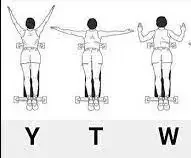
- Prone Y/T/w exercises: While resting on your stomach, raise your arms into Y/T/w postures for two to three sets of 8–12 to develop your postural muscles and lower traps.
- To increase neck endurance, perform isometric neck holds, which involve pressing the forehead into the palm while remaining still for five to ten seconds in each direction. 6–8 times.
- Take ergonomic breaks, practice good posture, and progressively extend the amount of time you can spend sitting up upright without slouching to achieve functional work and endurance holds.
Prevention
- Regular Stretching and Strengthening
- Gently stretch the muscles.
- Include exercises like chin tucks and shoulder blade squeezes to keep your muscles strong.
- Knowledge of Conscious Posture
- To avoid bending your neck forward, raise your display to eye level.
- Limit Prolonged Computer Use
- Stretch, walk, and stand to maintain healthy muscles.
- Every 30 to 60 minutes, take a rest.
- Managing Stress
- Try deep breathing exercises, yoga, or meditation to relax stiff neck and shoulder muscles.
- Manage your workload to lessen stress on your body and mind.
Conclusion
- The majority of avoidable neck pain is caused by computer use, which can be avoided by adopting easy strategies like proper posture, ergonomic workstation setup, frequent stretch breaks, and strengthening your shoulder and neck muscles while using techniques to alleviate stress and maintain relaxation.
- It is advisable to take care of your neck today because even minor lifestyle and ergonomic adjustments made on a regular basis can protect it and avoid pain in the future. By doing this, you can work more easily now and shield your neck from future pain.
FAQs
Why does using a computer for a long time affect my neck?
Long-term desk sitting that causes you to hunch your shoulders or lean forward strains the muscles and joints in your neck, resulting in stiffness, soreness, and even headaches.
How can I get rid of a neck ache while working right away?
To improve your posture and make the screen eye-level, try doing some light neck stretches, rolling your shoulders back, and using a warm compress for ten to fifteen minutes.
When is the right time for me to take computer breaks?
Take frequent pauses: Every 30 to 60 minutes, take a brief break to improve circulation and lessen strain.
Are there any exercises I may perform to help relieve my neck pain?
Indeed, posture can be improved and potential pain can be avoided by strengthening the muscles in the neck, shoulders, and upper back: Light neck stretches, scapular squeezes, and chin tucks are helpful.
What impact does using ice or heat have on neck pain?
Ice should be used during the first 48 to 72 hours if you experience swelling and acute pain. If you’re feeling stiffness or ongoing tightness, consider using heat.
When is the appropriate time to discuss my neck pain with a doctor or physical therapist?
Seek assistance right away if the discomfort is severe, lasts more than two to three weeks, or manifests as headaches, tingling, numbness, or weakness.
Reference
Harvard Health. (2024, July 23). 6 ways to ease neck pain. https://www.health.harvard.edu/pain/6-ways-to-ease-neck-pain
How can I relieve pain in my neck | Aurora Health Care. (n.d.). https://www.aurorahealthcare.org/services/aurora-spine-services/neck-pain/relief
Neck pain treatment. (n.d.). https://www.iodex.co.in/treatment-by-pain-type/neck-pain/treatment/
Healthdirect Australia. (n.d.). Neck pain. Treatments, Causes and Related Symptoms | Healthdirect. https://www.healthdirect.gov.au/neck-pain
Neck pain. (n.d.). Versus Arthritis. https://versusarthritis.org/about-arthritis/conditions/neck-pain/